Server Components, Client Components and Hydration
What `"use client"` actually does, why some components can touch your database and others can't, and how hydration turns static HTML into a live app.
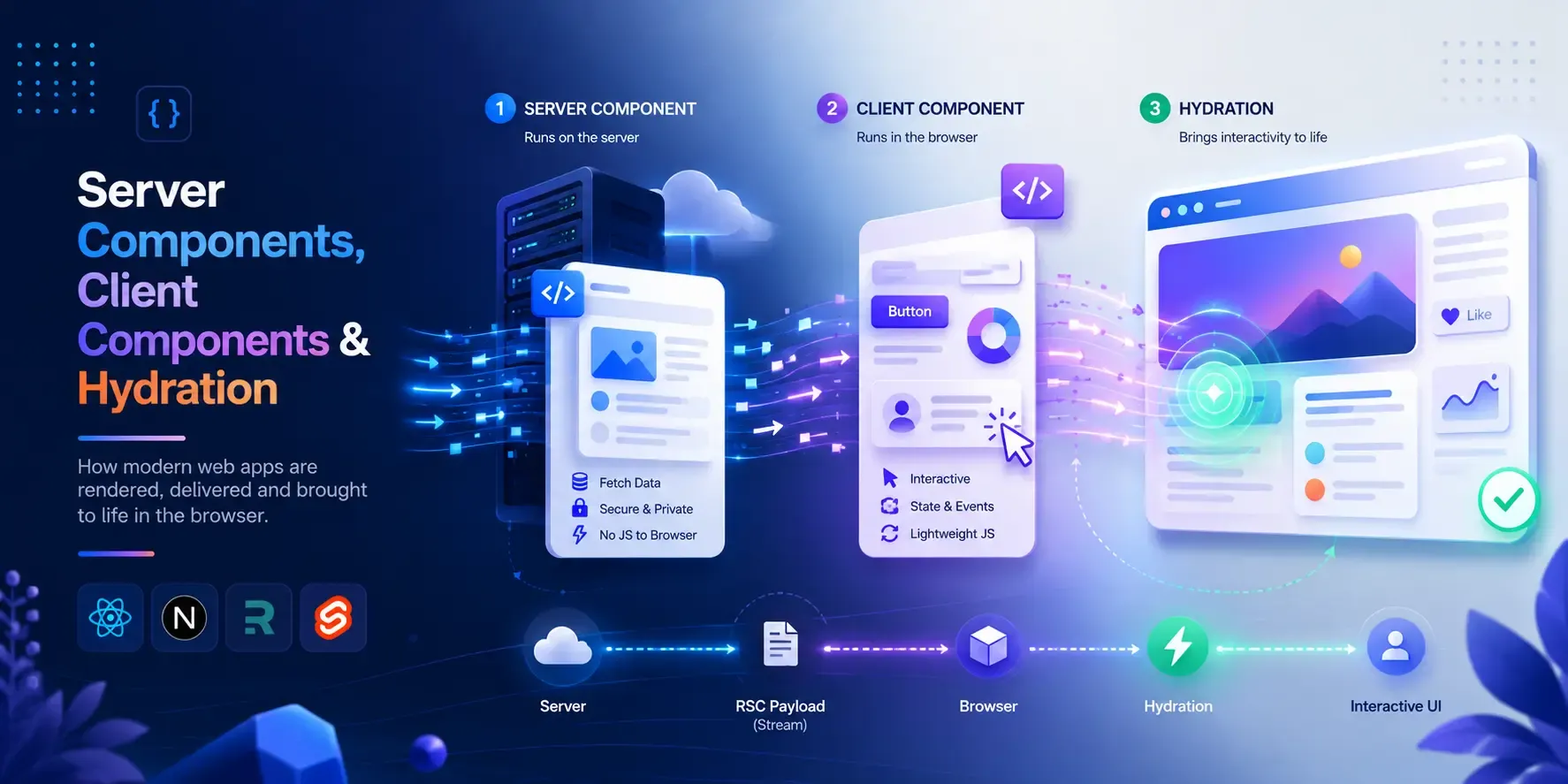
Understand these three and the whole
"use client"confusion disappears for good.
You must have written "use client" at the top of a file because Next.js threw an error at you, or because you wanted to use useState. It worked, the error went away and you moved on. But do you actually know what that one line did? Why some components can fetch from a database directly and others can’t? Why your onClick “doesn’t work” until a split second after the page loads? Why you sometimes get that irritating red “Hydration failed” error?
All of it comes down to three things : Server Components, Client Components, and the bridge between them — Hydration. Understand these and you’ll stop guessing where "use client" goes and start knowing.
Why does this even matter?
You can build application without understanding this. But you’ll keep paying for it:
- You’ll mark whole pages
"use client"“to be safe”, and ship a pile of unnecessary JavaScript to the browser — slower loads for no reason. - You’ll accidentally leak a secret API key into the browser bundle, because you didn’t know which code runs where.
- You’ll hit “Hydration failed” errors and fix them by random trial and error instead of knowing the cause.
- You’ll be confused about why you can’t use
useStatein one file but can in another.
This isn’t optional. It decides your bundle size, your security, and half the bugs you’ll ever file against Next.js.
The one idea everything is built on: two environments
Here is the whole mental model, and everything else follows from it.
Your React code can run in two different places:
- The server — a machine you control. It has your database, your secrets, your filesystem. It does not have a screen, a mouse, or a
window. - The browser — the user’s machine. It has the screen, the clicks, the keyboard,
window,localStorage. It does not have your database or your secrets.
These two places have completely different powers. Server Components are components that run in the first place. Client Components are components that run in the second (and, as we’ll see, the first too). That’s the entire distinction. Everything below is just consequences of where the code runs.
Server Components
In the modern Next.js App Router, every component is a Server Component by default. You don’t opt in — you’re already there. A Server Component runs only on the server. Its job is to produce output, send that output to the browser, and then it’s done — its code is never shipped to the browser as JavaScript.
Because it runs on the server, a Server Component can do things that would be impossible or unsafe in the browser:
awaita database query or an API call directly inside the component.- Read secrets like
process.env.API_KEY— they never leave the server. - Read the filesystem.
And because it never reaches the browser, it also can’t do browser things — no useState, no useEffect, no onClick, no window. There’s no screen for it to be interactive on.
Let’s see this in action -
- Create a route -
app/sc/page.tsx - Put in this code -
export default async function Page() {
  // This runs on the SERVER. It can fetch, read secrets, hit a DB.
  const secret = process.env.MY_SECRET ?? "(no secret set)";
  console.log("Server Component rendered. Secret is:", secret);

  return (
    <main>
      <h1>Server Component</h1>
      <p>This whole component ran on the server.</p>
    </main>
  );
}- Run
bun run devand open/sc.
Now run these tests — each one proves a property of Server Components:
- Look at where the
console.logprinted → it shows up in your terminal (the server), not in the browser’s console. That’s the defining test: this code ran on the server, the browser never saw it. - View the page source (Ctrl/Cmd+U) → the heading and text are right there in the HTML. The server did the rendering.
- Now try to break it: add
const [n, setNeed] = useState(0);inside this component. Next.js will throw an error telling youuseStateonly works in a Client Component. A Server Component has no state, because there’s no browser for state to live in.
That last error is the one everyone hits — and now you know exactly why it happens.
Benefits of Server Components
- Zero JS shipped for the component itself — smaller bundles, faster loads.
- Secrets stay secret — API keys and tokens never touch the browser.
- Data fetching is simple — just
awaitit, right where you need it, close to the source. - Great for the static, content-heavy parts of your UI.
Where Server Components don’t fit
Anything interactive. The moment you need a click handler, a piece of state, an effect, or a browser API, a Server Component can’t help — because none of those things exist on the server. For that, you need the other kind.
Client Components
A Client Component is a component that also runs in the browser. You create one by putting the "use client" directive at the very top of the file:
"use client";This is the same "use client" you’ve typed a hundred times — but here’s what it actually means, and the part most people get wrong.
"use client" does not mean “render this only in the browser”. It means “this component is allowed to run in the browser too, so it can use state, effects, event handlers and browser APIs.” A Client Component is still rendered on the server first (to produce the initial HTML), and then it comes alive in the browser. We’ll see exactly how in the Hydration section — that handoff is the whole point.
"use client" also marks a boundary. Once a file has it, that file and everything it imports becomes part of the client bundle. So you don’t sprinkle "use client" on every file — you put it at the top of the interactive leaf, and the components it pulls in come along for the ride.
Let’s see this in action -
- Create a component -
app/cc/Counter.tsx - Put in this code -
"use client";

import { useState } from "react";

export default function Counter() {
  console.log("Client Component rendered (look in the BROWSER console)");
  const [count, setCount] = useState(0);

  return (
    <button onClick={() => setCount(count + 1)}>
      Clicked {count} times
    </button>
  );
}- Create a page that uses it -
app/cc/page.tsx
import Counter from "./Counter";

export default function Page() {
  return (
    <main>
      <h1>Client Component</h1>
      <Counter />
    </main>
  );
}- Run
bun run devand open/cc.
Now run these tests — each one proves a property of Client Components:
- Open the browser console → you’ll see “Client Component rendered” there (and also once in the terminal, from that first server render). Compare with the Server Component, whose log only appeared in the terminal. This one runs in both places.
- Click the button → the count goes up. State and event handlers work, because this component is alive in the browser.
- View the page source (Ctrl/Cmd+U) → the button is already in the HTML, showing “Clicked 0 times”. It was server-rendered first. It just wasn’t clickable yet — and that gap is exactly what Hydration is about.
Notice the natural division of labour: app/cc/page.tsx stays a Server Component (no "use client"), and only the tiny interactive Counter is a Client Component. That’s the pattern — keep the server stuff on the server, and push "use client" down to the smallest interactive piece.
Benefits of Client Components
- Interactivity — state, event handlers, effects, the things that make an app feel alive.
- Browser APIs —
window,localStorage, geolocation, anything that only exists on the user’s machine. - They’re still server-rendered for the first paint, so you keep good SEO and a fast first view.
Where Client Components don’t fit
- They ship JavaScript to the browser, so over-using them bloats your bundle.
- They can’t directly
awaityour database or touch secrets — that code would end up in the browser. Fetch on the server, then pass the data down as props.
Hydration — the bridge between the two
So far we have two facts that seem to clash:
- A Client Component is server-rendered first into plain HTML.
- A Client Component is interactive in the browser.
How does a piece of static HTML from the server become a live, clickable React app in the browser? That process has a name: Hydration.
Here’s the sequence on first load, step by step:
- The server renders everything to HTML and sends it. The page appears instantly — but it’s a photograph. The button is there, but clicking it does nothing.
- In the background, the browser downloads the JavaScript for your Client Components.
- React runs in the browser, walks over the existing HTML, and attaches the event handlers and state to it — “adopting” the server’s HTML instead of rebuilding it. This is hydration.
- Now the button is alive. Clicks work.
Think of it like this: the server ships a fully built but unplugged appliance. Hydration is plugging it in. The shape was there all along; hydration adds the electricity.
This is also why you sometimes click a button right as a page loads and nothing happens — you clicked in the gap between step 1 (HTML visible) and step 4 (hydrated). On a fast connection it’s imperceptible; on a slow phone with a big bundle, that dead zone is real, and it’s a big reason to keep Client Components small.
Seeing hydration (and the dead zone)
- Open your
/ccpage in the browser, then in DevTools → Network, set throttling to “Slow 3G” and reload. - For a moment you’ll see the button rendered but unresponsive — clicks do nothing.
- Then the JS finishes loading, hydration runs, and suddenly the button works. You just watched the appliance get plugged in.
Hydration errors — the scary red ones
Hydration has one strict rule: the HTML React produced on the server must match what React produces on the first render in the browser. React assumes they’re identical so it can just adopt the server’s HTML. If they differ, React panics — that’s the “Hydration failed” error.
When does the server and the client disagree? Whenever your component renders something that isn’t the same in both places. The classic causes:
- Time and randomness —
new Date(),Date.now(),Math.random(). The server computes one value, the browser computes a different one a moment later → mismatch. - Browser-only APIs during render — reading
window,localStorage, ortypeof window !== "undefined"directly in the render body. On the serverwindowdoesn’t exist, so the server renders one thing and the browser another. - Invalid HTML nesting — e.g. a
<div>inside a<p>. The browser “fixes” the HTML, so the DOM no longer matches what React expected.
Let’s reproduce one on purpose -
- In your
Counter.tsx, change the button text to include the current time:
"use client";

import { useState } from "react";

export default function Counter() {
  const [count, setCount] = useState(0);
  return (
    <button onClick={() => setCount(count + 1)}>
      Clicked {count} times at {new Date().toISOString()}
    </button>
  );
}- Reload
/ccand watch the console → you’ll get a hydration mismatch warning, because the server rendered one timestamp and the browser rendered a different one.
The fix is to not render request-time/browser-time values during the initial render. Compute them after hydration, inside a useEffect, so the first browser render matches the server:
"use client";

import { useState, useEffect } from "react";

export default function Counter() {
  const [count, setCount] = useState(0);
  const [time, setTime] = useState<string | null>(null);

  // Runs only in the browser, AFTER hydration — so it can't cause a mismatch.
  useEffect(() => {
    setTime(new Date().toISOString());
  }, []);

  return (
    <button onClick={() => setCount(count + 1)}>
      Clicked {count} times {time && `at ${time}`}
    </button>
  );
}
Now the server and the first browser render agree (both show no time), hydration succeeds, and the time fills in a beat later. Once you understand the matching rule, every hydration error you’ll ever see falls into one of those buckets.
Putting them together: composing server and client
The real skill is mixing the two. Two rules carry you a long way.
Rule 1 — A Server Component can render a Client Component, but not the other way around (by import). You build a tree of server components and drop interactive client “islands” into it. This is the normal flow, exactly like our /cc page rendering <Counter />.
Rule 2 — Data crosses from server to client through props, and those props must be serializable. You fetch on the server and pass plain data down:
// Server Component — fetches on the server
import LikeButton from "./LikeButton";

export default async function Page() {
  const post = await getPost(); // safe: runs on the server
  return <LikeButton likes={post.likes} />; // pass plain data down
}
You can pass strings, numbers, arrays, plain objects — anything React can serialize. You cannot pass a function (like a database client or an event handler) across the boundary; it can’t be sent over the wire.
There’s also a neat trick that surprises people: you can nest a Server Component inside a Client Component, as long as you pass it as children (or a prop), not by importing it. The Server Component is rendered on the server, and the Client Component just receives the finished output as a slot to place. That’s how you get, say, a server-fetched <Cart> living inside a client <Modal> that toggles with state.
Wrapping up
Step back and it’s all one idea — where does this code run?
- Server Components (the default) run only on the server. They fetch data, hold secrets, ship zero JS — but can’t be interactive.
- Client Components (
"use client") run on the server first and then in the browser. They give you state, events and browser APIs — at the cost of shipping JS. - Hydration is the bridge: the server sends static HTML, then React “plugs it in” in the browser to make it interactive. The server and client must render the same thing, or you get a hydration error.
So the next time you reach for "use client", you won’t be work around to silence an error. You’ll know that you’re drawing a boundary, shipping some JavaScript, and signing up for hydration — and you’ll put it exactly where it belongs: on the smallest interactive commponent, and nowhere else.